Firmware Update Mistakes That Create Security Gaps
Treating firmware updates as routine maintenance ignores the low-level access they grant, turning a standard patch into a permanent backdoor if verification fails.

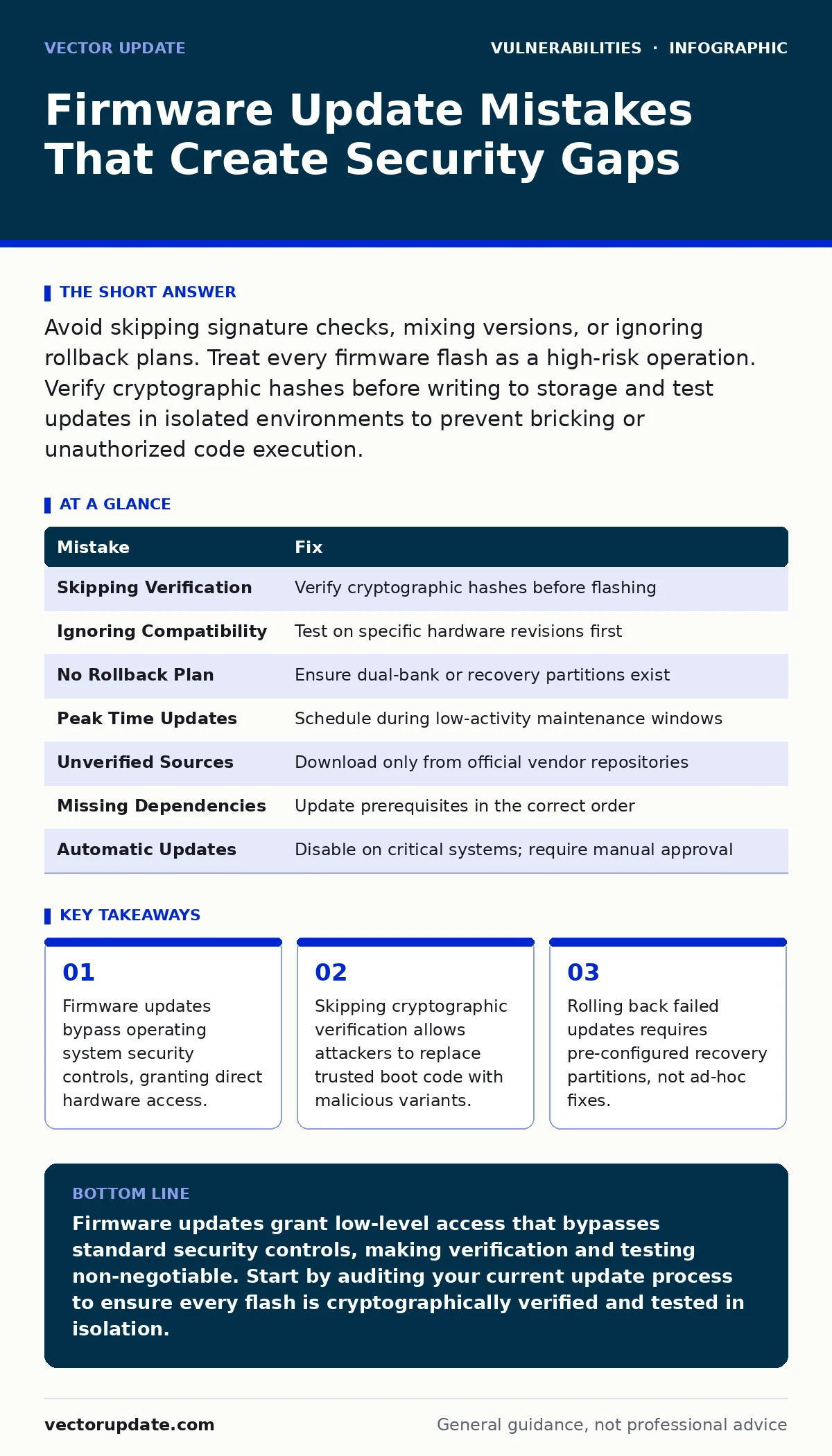
Avoid skipping signature checks, mixing versions, or ignoring rollback plans. Treat every firmware flash as a high-risk operation. Verify cryptographic hashes before writing to storage and test updates in isolated environments to prevent bricking or unauthorized code execution.
Firmware sits below the operating system. It controls how hardware interacts with software. When you update this layer, you change the foundation of the device. A mistake here does not just crash an application. It can lock you out of the machine entirely or install code that persists through reinstalls.
Most administrators treat firmware updates like software patches. This mindset creates risk. Firmware updates require a different level of caution because they operate at the hardware level. The following mistakes are common and dangerous.
Mistake 1: Skipping Cryptographic Verification
Many administrators download firmware files and flash them without checking the digital signature. They trust the source website or the email attachment. This trust is misplaced. If an attacker intercepts the download or compromises the download server, they can replace the legitimate file with a malicious one.
Why it hurts:
Firmware runs with the highest privilege on the device. Malicious firmware can capture keystrokes, decrypt traffic, or disable security modules before the operating system even loads. Because it resides in non-volatile memory, standard antivirus scans often miss it. This creates a persistent backdoor that survives operating system reinstalls.
The fix:
Always verify the cryptographic signature or hash of the firmware file before applying it. Compare the hash provided by the vendor with the hash of the downloaded file. Use command-line tools to generate and compare SHA-256 hashes. If the hashes do not match exactly, discard the file. Do not proceed with the update.
Mistake 2: Ignoring Version Compatibility
Administrators often apply the latest firmware version to all devices in a batch. They assume newer is always better. This approach fails when devices have different hardware revisions or dependency requirements. Flashing incompatible firmware can brick the device or introduce new vulnerabilities that the specific hardware revision cannot mitigate.
Why it hurts:
Incompatible firmware may not initialize hardware components correctly. This can lead to data corruption, loss of connectivity, or complete device failure. In a server environment, this means downtime. In an endpoint environment, it means a device that cannot join the network or access resources.
The fix:
Maintain an inventory of hardware revisions for every device class. Check the vendor release notes for specific compatibility warnings. Test firmware updates on a small subset of devices before rolling them out broadly. Ensure that the firmware version matches the specific hardware revision and any dependent components like BIOS or UEFI versions.
Mistake 3: Failing to Plan for Rollback
When an update fails, the device may become unbootable. Without a plan, recovery becomes a manual, time-consuming process. Some administrators assume they can simply reflash the previous version. This assumption fails if the update process overwrites the recovery partition or changes the boot mode.
Why it hurts:
A failed update without a rollback plan leads to extended downtime. You lose access to the device until you can physically intervene or use specialized recovery tools. This disrupts business continuity and increases the risk of data loss if the device was in use during the failure.
The fix:
Verify that the device supports dual-bank firmware or has a dedicated recovery partition before updating. These features allow the device to boot from the previous version if the new one fails. Document the specific recovery procedure for each device type. Test the rollback process in a lab environment to ensure it works as expected.
Mistake 4: Updating During Peak Operations
Scheduling firmware updates during business hours or peak load times increases the risk of data loss and service interruption. Firmware updates often require the device to reboot and may take longer than expected. Interrupting the process can corrupt the firmware image, leading to a bricked device.
Why it hurts:
Interruptions during the flash process can leave the firmware in an incomplete state. This renders the device unusable. In a production environment, this causes immediate service outages. It also forces IT staff to prioritize emergency recovery over other critical tasks.
The fix:
Schedule firmware updates during maintenance windows with low user activity. Notify users in advance about potential downtime. Ensure that critical services have failover mechanisms in place. Avoid updating devices that are actively processing transactions or hosting critical applications.
Mistake 5: Neglecting Supply Chain Verification
Administrators often trust firmware downloads from third-party mirrors or unofficial sources. They do not verify that the source is authorized by the original equipment manufacturer. This practice exposes the organization to supply chain attacks where malicious code is injected into the firmware before it reaches the end user.
Why it hurts:
Malicious firmware from unverified sources can bypass operating system security controls. It can establish persistent access that is difficult to detect and remove. This type of attack is particularly dangerous because it operates at a level below the operating system, making traditional security tools ineffective.
The fix:
Download firmware only from the official vendor website or authorized repositories. Verify the identity of the website using digital certificates. Avoid using third-party mirrors or file-sharing sites for firmware downloads. Implement strict access controls to ensure that only authorized personnel can download and apply firmware updates.
See also: Risk-Based Vulnerability Management: Benefits, Limits, and Reality
Mistake 6: Overlooking Dependency Updates
Firmware often depends on other components like drivers, BIOS settings, or baseboard management controllers. Updating firmware without updating these dependencies can cause conflicts. These conflicts may lead to instability, security gaps, or failure to apply the update correctly.
Why it hurts:
Mismatched dependencies can prevent the firmware from functioning correctly. This can lead to reduced performance, security vulnerabilities, or complete failure of the hardware component. It also complicates troubleshooting because the root cause is not immediately obvious.
The fix:
Review the vendor documentation for any required prerequisite updates. Apply dependent updates in the correct order. Test the entire stack in a non-production environment before deploying to production. Ensure that all components are compatible with the new firmware version.
Mistake 7: Assuming Automatic Updates Are Safe
Some devices support automatic firmware updates. Administrators often enable this feature and assume it is secure. This assumption fails because automatic updates may bypass manual verification steps. They may also apply updates without checking for compatibility or dependency issues.
Why it hurts:
Automatic updates can introduce instability if they apply incompatible firmware. They can also expose the device to supply chain attacks if the automatic update mechanism is compromised. This lack of control reduces the ability to manage risk and respond to emerging threats.
The fix:
Disable automatic firmware updates on critical infrastructure devices. Use manual updates with strict verification procedures. If automatic updates are necessary, configure them to require approval before applying. Monitor the update process closely to ensure that it completes successfully.
| Mistake | Fix |
|---|---|
| Skipping Verification | Verify cryptographic hashes before flashing |
| Ignoring Compatibility | Test on specific hardware revisions first |
| No Rollback Plan | Ensure dual-bank or recovery partitions exist |
| Peak Time Updates | Schedule during low-activity maintenance windows |
| Unverified Sources | Download only from official vendor repositories |
| Missing Dependencies | Update prerequisites in the correct order |
| Automatic Updates | Disable on critical systems; require manual approval |
Key takeaways
- Firmware updates bypass operating system security controls, granting direct hardware access.
- Skipping cryptographic verification allows attackers to replace trusted boot code with malicious variants.
- Rolling back failed updates requires pre-configured recovery partitions, not ad-hoc fixes.
Firmware updates grant low-level access that bypasses standard security controls, making verification and testing non-negotiable. Start by auditing your current update process to ensure every flash is cryptographically verified and tested in isolation.
Frequently asked questions
How do I verify a firmware file hash?
Use a command-line tool to generate the SHA-256 hash of the downloaded file and compare it to the hash provided by the vendor. If they match exactly, the file is intact.
Can I update firmware remotely?
Yes, but only if the connection is encrypted and the update process includes cryptographic verification. Remote updates increase the risk of interception, so strict access controls are necessary.
What if a device bricks after an update?
Check if the device has a recovery partition or dual-bank firmware. If so, follow the vendor’s recovery procedure to revert to the previous version. If not, physical intervention may be required.
How often should I update firmware?
Update firmware when security patches are released or when critical stability fixes are needed. Do not update on a fixed schedule without assessing the risk and compatibility of each release.
How this guide was produced: written by the Vector Update editorial team with AI assistance, checked against the public references listed below, and reviewed when the facts change. See our editorial policy or report an error.