Cloud Firewall Mistakes That Expose Your Infrastructure
Misconfigured cloud firewalls often allow more traffic than they block because default deny rules are frequently disabled by accident during rapid scaling.

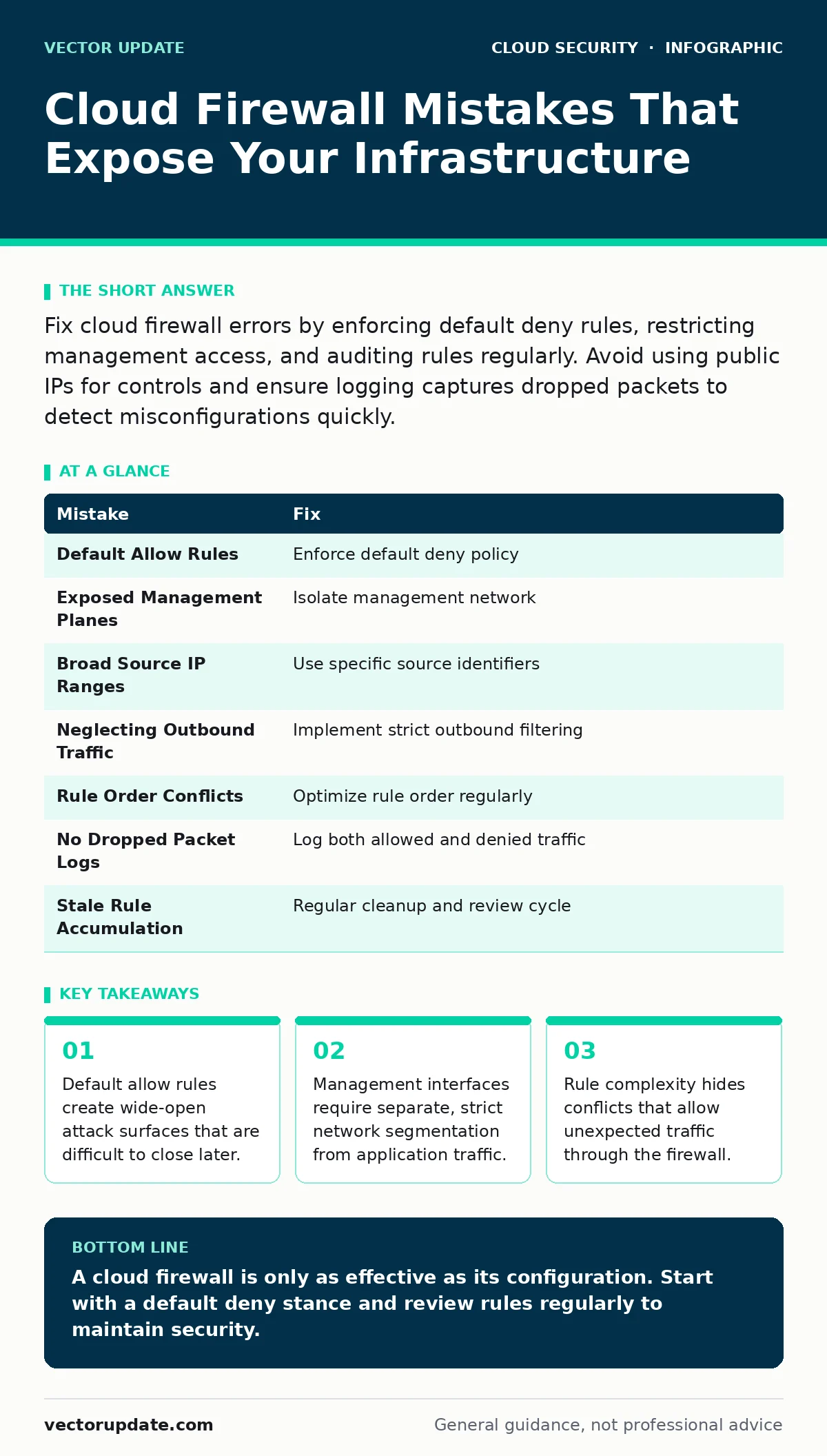
Fix cloud firewall errors by enforcing default deny rules, restricting management access, and auditing rules regularly. Avoid using public IPs for controls and ensure logging captures dropped packets to detect misconfigurations quickly.
Mistake 1: Relying on Default Allow Rules
Many cloud firewall configurations start with a permissive baseline. Administrators often leave the default rule set to allow all inbound or outbound traffic to speed up initial deployment. This creates a security posture where you must manually block every known threat. New services or unknown ports remain open by default.
Why it hurts:
When you use a default allow stance, any misconfiguration or new service automatically inherits open access. Attackers scan for open ports constantly. If a service launches without an explicit block rule, it is immediately visible to the internet. You cannot secure what you do not explicitly define.
The fix:
Implement a default deny policy. Configure the firewall to drop all traffic unless a specific rule permits it. Review your existing allow rules and remove any that are no longer necessary. This forces you to document every valid connection path. It also simplifies audits because every allowed flow has an explicit justification.
Mistake 2: Leaving Management Planes Exposed
Firewalls require administrative interfaces for configuration and monitoring. Some administrators place these interfaces on the same network segment as public-facing applications. They assume the firewall’s own security is sufficient to protect its control plane. This exposes the management console to the same threats as the web servers.
Why it hurts:
If an attacker compromises a web application behind the firewall, they may pivot to the firewall itself. Access to the management interface allows them to modify rules. They can open ports for lateral movement or disable logging entirely. You lose visibility and control simultaneously.
The fix:
Isolate the management plane from data traffic. Use a dedicated administrative network that is not accessible from the public internet. Restrict access to this network using multi-factor authentication and strict IP allow-lists. Consider using a bastion host or jump server for administrative access. This separation ensures that compromising an application does not grant control over the perimeter.
Mistake 3: Overly Broad Source IP Ranges
To accommodate dynamic IP addresses or simplify configuration, some teams use large subnet masks in firewall rules. They might allow traffic from an entire Class B network instead of specific hosts. They believe this reduces the administrative burden of updating rules when IP addresses change.
Why it hurts:
Broad source ranges increase the attack surface significantly. Every IP address within that range can attempt to connect. This makes it difficult to distinguish legitimate traffic from scans or attacks. It also complicates forensic analysis because you cannot easily identify the source of malicious activity.
The fix:
Use the most specific source identifiers possible. If the source IP is static, use the single address. If it is dynamic, use the smallest possible subnet that covers the valid range. For services that require broad access, consider using a VPN or a secure tunnel instead of opening the firewall directly. This limits exposure to known and trusted entities only.
Mistake 4: Neglecting Outbound Traffic Controls
Most firewall configuration efforts focus on inbound traffic. Administrators worry about external attackers entering the network. They often leave outbound traffic unrestricted, assuming that internal systems are trusted. This ignores the risk of compromised internal hosts communicating with external command-and-control servers.
Why it hurts:
If a server inside your network is compromised, it can exfiltrate data or download malware. Unrestricted outbound traffic allows these actions to proceed unnoticed. Attackers often use standard ports like HTTP or HTTPS for data exfiltration. Without outbound filtering, you have no way to stop this communication at the perimeter.
The fix:
Implement strict outbound filtering rules. Allow only the traffic necessary for business operations. Block traffic to known malicious destinations and ports not used by your applications. Monitor outbound connections for anomalies. This adds a layer of defense that contains breaches and limits their impact.
Mistake 5: Ignoring Rule Order and Conflicts
Firewalls evaluate rules sequentially from top to bottom. Some administrators add new rules at the end of the list without reviewing existing entries. They assume that newer rules take precedence or that the firewall optimizes the order automatically. This leads to logical conflicts where broader rules override specific restrictions.
Why it hurts:
A broad allow rule placed before a specific deny rule will prevent the deny rule from ever being evaluated. Traffic that should be blocked will pass through. This creates hidden vulnerabilities that are difficult to detect. The firewall appears to be configured correctly, but it is actually allowing unauthorized access.
The fix:
Regularly review and optimize rule order. Place specific rules before general rules. Use tools that analyze rule conflicts and provide optimization suggestions. Document the purpose of each rule to aid in future reviews. This ensures that your intended security policy is enforced correctly.
See also: Secure Cloud APIs: Block Exploits, Limit Scope, and Verify Identity · Nation-State Cyber Attacks: Definition, Methods, and Defense
Mistake 6: Failing to Log Dropped Packets
Many administrators configure firewalls to log only allowed traffic. They assume that logging dropped packets will generate too much noise. They prioritize storage efficiency over visibility. This results in a blind spot for attack detection.
Why it hurts:
Without logs of dropped traffic, you cannot detect scanning activity or attempted attacks. You miss early indicators of compromise. Attackers often probe for open ports before launching an exploit. If you do not log these probes, you have no record of their presence. This delays your response time and increases the risk of a successful breach.
The fix:
Enable logging for both allowed and denied traffic. Configure your logging system to filter and aggregate noise where possible. Use alerts to highlight suspicious patterns in dropped traffic. This provides a complete picture of network activity and helps detect threats early.
Mistake 7: Stale Rules Accumulation
Over time, firewall rules accumulate as services are added and removed. Administrators often keep old rules "just in case" they are needed again. They do not establish a process for regular cleanup. This leads to rule bloat and increased complexity.
Why it hurts:
Stale rules increase the attack surface unnecessarily. They make it harder to audit the firewall configuration. You may allow traffic to services that no longer exist or are no longer in use. This complexity also increases the risk of misconfiguration during future changes.
The fix:
Implement a regular review cycle for firewall rules. Remove rules that are no longer needed. Document the lifecycle of each rule. Use automation to identify unused rules based on traffic logs. This keeps the firewall configuration clean and manageable.
| Mistake | Fix |
|---|---|
| Default Allow Rules | Enforce default deny policy |
| Exposed Management Planes | Isolate management network |
| Broad Source IP Ranges | Use specific source identifiers |
| Neglecting Outbound Traffic | Implement strict outbound filtering |
| Rule Order Conflicts | Optimize rule order regularly |
| No Dropped Packet Logs | Log both allowed and denied traffic |
| Stale Rule Accumulation | Regular cleanup and review cycle |
Key takeaways
- Default allow rules create wide-open attack surfaces that are difficult to close later.
- Management interfaces require separate, strict network segmentation from application traffic.
- Rule complexity hides conflicts that allow unexpected traffic through the firewall.
A cloud firewall is only as effective as its configuration. Start with a default deny stance and review rules regularly to maintain security.
Frequently asked questions
How often should I review my cloud firewall rules?
Review your rules at least quarterly or whenever significant infrastructure changes occur. More frequent reviews are recommended for high-security environments.
Can I use the same firewall configuration for multiple environments?
You can use a baseline configuration, but each environment should have specific rules tailored to its traffic patterns. Avoid copying configurations without validation.
What is the difference between a cloud firewall and a security group?
Security groups operate at the instance level, while cloud firewalls operate at the network level. Use both for layered defense.
How do I handle dynamic IP addresses in firewall rules?
Use the smallest possible subnet range or consider using a VPN to create a static tunnel for management access.
How this guide was produced: written by the Vector Update editorial team with AI assistance, checked against the public references listed below, and reviewed when the facts change. See our editorial policy or report an error.