How Does Encrypted Email Work: The Mechanics of Secure Messaging
Encrypted email protects your message content from network observers, but it often leaves your recipient address and subject line visible to everyone along the delivery path.
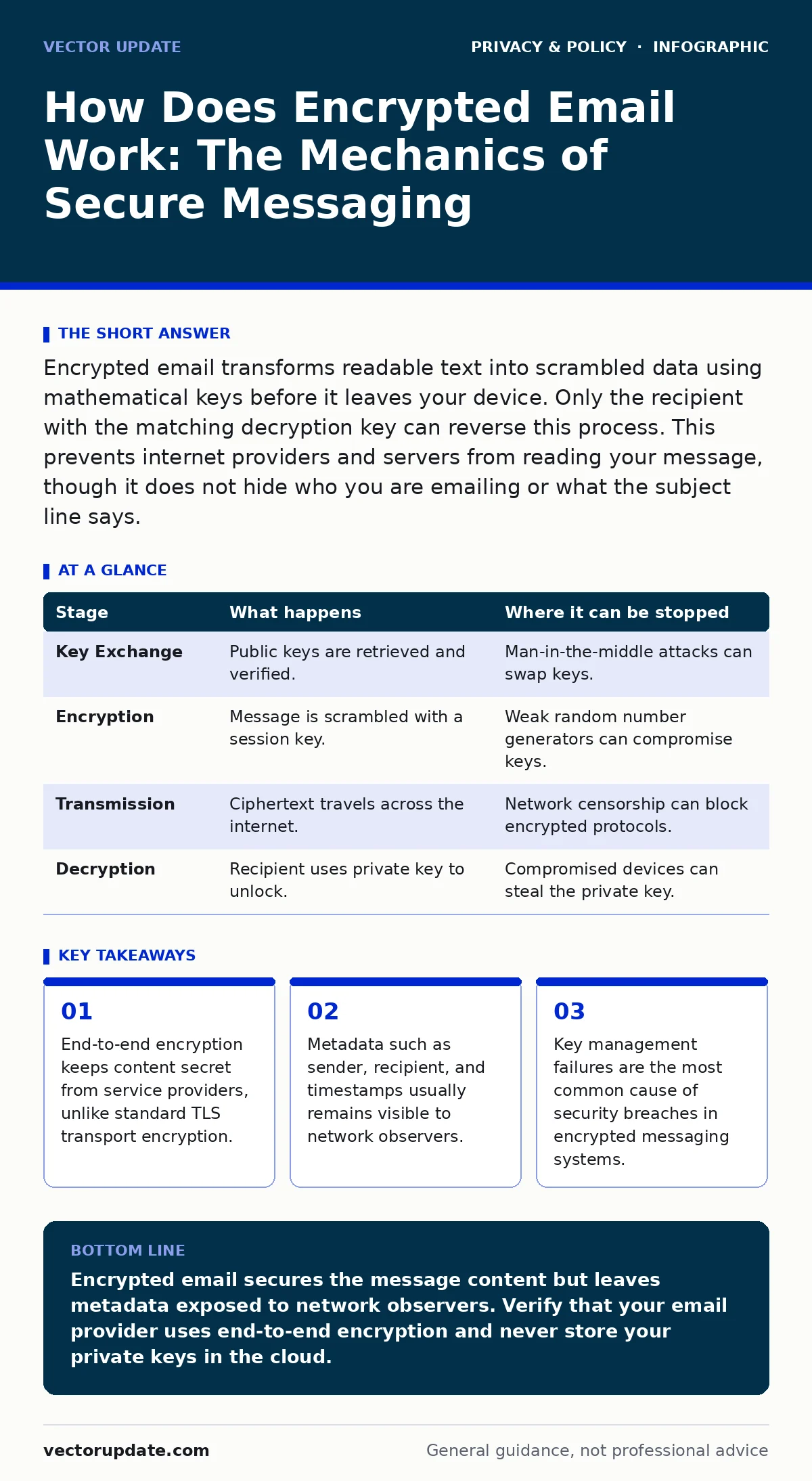
Encrypted email transforms readable text into scrambled data using mathematical keys before it leaves your device. Only the recipient with the matching decryption key can reverse this process. This prevents internet providers and servers from reading your message, though it does not hide who you are emailing or what the subject line says.
How does encrypted email work
Encrypted email works by converting plain text into ciphertext using a pair of mathematical keys, ensuring that only the intended recipient can read the message. Most people assume their email is secure because they see a lock icon in their browser, but that lock only protects the data while it travels between your device and the email provider’s server.
This is known as transport layer security. It does not prevent the email provider itself from reading your messages. True privacy requires end-to-end encryption, where the data remains scrambled from the moment you click send until it reaches the recipient’s inbox. This mechanism shifts the trust model from the service provider to the cryptographic keys held by the users.
Stage 1: Key Generation and Exchange
The process begins with key generation. Each user in an encrypted email system possesses two keys: a public key and a private key. The public key is shared openly, while the private key remains secret on the user’s device. When you want to send a secure message, your email client retrieves the recipient’s public key. This often happens automatically if both parties use a compatible service, or manually if you import a key file. The system uses the recipient’s public key to encrypt a session key, which is a temporary symmetric key used for the actual message encryption. This hybrid approach combines the speed of symmetric encryption with the security of asymmetric key exchange.
| Stage | What happens | Where it can be stopped |
|---|---|---|
| Key Exchange | Public keys are retrieved and verified. | Man-in-the-middle attacks can swap keys. |
| Encryption | Message is scrambled with a session key. | Weak random number generators can compromise keys. |
| Transmission | Ciphertext travels across the internet. | Network censorship can block encrypted protocols. |
| Decryption | Recipient uses private key to unlock. | Compromised devices can steal the private key. |
Stage 2: Message Encryption
Once the session key is established, your email client encrypts the body of the message. This transforms the text into an unreadable string of characters called ciphertext. The encryption algorithm ensures that even if someone intercepts the data, they cannot derive the original message without the session key. The session key itself is then encrypted using the recipient’s public key.
This creates a digital envelope. The outer layer, protected by the public key, can only be opened by the corresponding private key. This method allows for efficient encryption of large messages while maintaining strong security. The subject line and headers are often left unencrypted in many standard implementations, which is a critical design choice you must understand.
Stage 3: Transmission and Routing
The encrypted package is then sent to the mail transfer agent, which is the server responsible for routing email. This server sees only the ciphertext. It does not have the private key to decrypt the message body. The package travels through various intermediate servers, known as mail exchange servers, until it reaches the recipient’s mail server.
During this transit, the data is protected from casual snooping by internet service providers and network administrators. However, the routing information remains visible. These servers log the sender’s IP address, the recipient’s address, and the time of transmission. This metadata can be used to build a profile of your communication habits, even if the content remains secret.
Stage 4: Decryption and Verification
When the encrypted email arrives at the recipient’s server, it is stored as ciphertext. The recipient’s email client requests the data and uses the recipient’s private key to decrypt the outer envelope. This reveals the session key. The client then uses the session key to decrypt the message body. If the decryption fails, the message is unreadable. Most systems also include a digital signature. This is a mathematical proof that the message came from the claimed sender and has not been altered in transit. The recipient’s client verifies this signature before displaying the text. If the signature does not match, the client warns the user that the message may have been tampered with.
The Hidden Cost of Metadata Privacy
While the content of your email is secure, the metadata is not. Metadata includes the sender, recipient, timestamp, and IP addresses. This data reveals your social graph and communication patterns. Law enforcement and intelligence agencies can analyze this metadata to determine relationships and activities without ever needing to decrypt the message.
This is why privacy advocates often recommend using secure messaging apps for sensitive conversations rather than email. Email was designed for asynchronous communication, not privacy. The infrastructure relies on public directories and routing tables that inherently expose this information. You cannot encrypt the routing table without breaking the global email system.
Where the Chain Breaks
Encrypted email fails when the endpoints are compromised. If your computer has malware, the attacker can read the message after it is decrypted on your screen. If the recipient’s device is infected, the same applies. Key management is the weakest link. Users often store private keys in insecure locations or share them via unencrypted channels.
Some services offer "zero-knowledge encryption," meaning the provider never sees your private key. This is preferable, but it shifts the burden of backup to you. If you lose your private key, your messages are permanently lost. There is no password reset button for true end-to-end encryption. You must balance convenience with the risk of permanent data loss.
Practical Limitations for Administrators
System administrators face challenges when deploying encrypted email. Compliance tools that scan for sensitive data cannot read encrypted content. This creates a conflict between security and regulatory requirements. Some organizations choose to encrypt emails only for external recipients, keeping internal communications unencrypted for monitoring.
This approach reduces protection but satisfies audit requirements. You must decide what level of privacy is acceptable for your organization. Forcing encryption on all users can lead to poor adoption if the user experience is difficult. Simplified key exchange mechanisms, such as those integrated into webmail interfaces, help, but they often sacrifice some security for ease of use.
See also: Example of Digital Privacy: How Control Works in Practice · Biometric Data Definition: How Identity Templates Create Permanent Risk
Choosing the Right Protocol
Different protocols handle encryption differently. Pretty Good Privacy, or PGP, has been around for decades and is highly secure but difficult to use. It requires manual key management. Secure/Multipurpose Internet Mail Extensions, or S-MIME, is easier to manage in corporate environments but relies on a centralized certificate authority.
End-to-end encrypted webmail services simplify the process by handling keys automatically, but they introduce a trusted third party. You must trust that the service provider does not log your activities. For high-security needs, consider using a combination of tools. You might use a secure messenger for real-time coordination and encrypted email for formal documentation. This layered approach mitigates the weaknesses of any single system.
Key takeaways
- End-to-end encryption keeps content secret from service providers, unlike standard TLS transport encryption.
- Metadata such as sender, recipient, and timestamps usually remains visible to network observers.
- Key management failures are the most common cause of security breaches in encrypted messaging systems.
Encrypted email secures the message content but leaves metadata exposed to network observers. Verify that your email provider uses end-to-end encryption and never store your private keys in the cloud.
Frequently asked questions
Can encrypted email be hacked?
The encryption algorithm itself is rarely broken. Hacks usually occur by stealing the private key from a user’s device or through phishing attacks that trick the user into revealing their credentials.
Does encrypted email hide my identity?
No. Encrypted email hides the content of your message, but the sender and recipient addresses, as well as the subject line, are often visible to internet service providers and email servers.
What happens if I lose my private key?
You will permanently lose access to any messages encrypted with that key. Unlike standard passwords, there is no way to reset a private key without losing the data it protects.
Is encrypted email legal?
Yes. Using encrypted email is legal in most jurisdictions. However, some organizations may restrict its use due to compliance requirements that mandate the ability to monitor communications.
How this guide was produced: written by the Vector Update editorial team with AI assistance, checked against the public references listed below, and reviewed when the facts change. See our editorial policy or report an error.