Difference Between Identity and Access Management Explained
Identity management proves who you are, while access management decides what you can touch, creating two distinct failure points in cloud security.
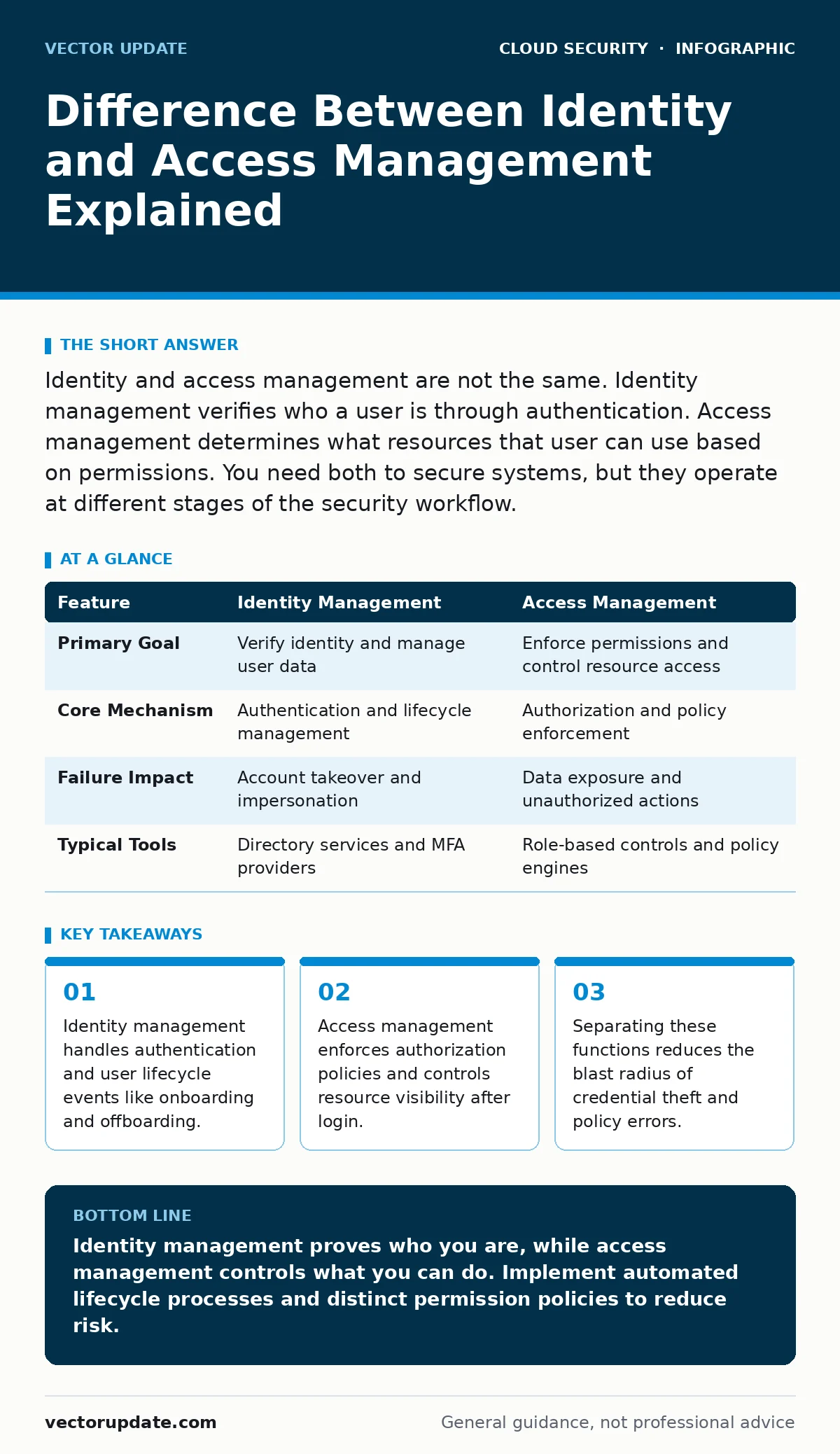
Identity and access management are not the same. Identity management verifies who a user is through authentication. Access management determines what resources that user can use based on permissions. You need both to secure systems, but they operate at different stages of the security workflow.
What is the difference between identity and access management?
Identity management verifies the user’s identity, while access management controls the resources that identity can reach. Identity management focuses on the "who" by authenticating credentials and managing user profiles. Access management focuses on the "what" by applying permission sets and policy rules. You treat them as separate layers because a valid identity does not automatically grant full system access. This separation prevents over-privileged accounts from causing accidental damage.
| Feature | Identity Management | Access Management |
|---|---|---|
| Primary Goal | Verify identity and manage user data | Enforce permissions and control resource access |
| Core Mechanism | Authentication and lifecycle management | Authorization and policy enforcement |
| Failure Impact | Account takeover and impersonation | Data exposure and unauthorized actions |
| Typical Tools | Directory services and MFA providers | Role-based controls and policy engines |
Why does separating identity from access matter?
Separating these functions creates a security boundary that limits damage during breaches. If identity management fails, an attacker gains a valid login but still faces access controls. If access management fails, legitimate users might see too much data, but identity logs remain intact for forensics. You gain better visibility into each layer’s performance. This architecture supports the principle of least privilege more effectively than a single monolithic system. It also simplifies auditing because you can trace identity events and access events independently.
How does identity management handle user lifecycles?
Identity management oversees the entire lifespan of a user account from creation to deletion. It handles onboarding by provisioning accounts in directory services. It manages changes like role updates or department transfers. It executes offboarding by disabling accounts and removing credentials. This process prevents orphaned accounts from remaining active after an employee leaves. Automated provisioning reduces human error in account creation. Proper lifecycle management ensures that identity data stays accurate across all connected systems.
What mechanisms drive access management decisions?
Access management uses policies to decide whether a request should be approved. It evaluates the user’s role, the resource’s sensitivity, and the context of the request. Role-based access control assigns permissions based on job functions. Attribute-based access control adds dynamic factors like time of day or device health. These mechanisms enforce least privilege by granting only the minimum necessary access. You configure these policies to block unauthorized actions even when credentials are valid. This layer acts as a gatekeeper for every resource interaction.
When does standard identity advice fail?
Standard advice often assumes static roles and permanent access rights. This assumption breaks down in dynamic cloud environments where resources change rapidly. Temporary access for contractors or emergency repairs requires short-lived credentials. Standard identity management might not handle these transient needs efficiently. You need automated expiration and revocation mechanisms. Without them, temporary access becomes permanent risk. This gap often leads to privilege creep where old permissions remain active long after they are needed.
See also: Access Reviews Explained: The Hidden Cost of Stale Permissions · Cloud Landing Zones: Definition, Purpose, and Core Architecture
How do cloud environments complicate these systems?
Cloud environments introduce ephemeral resources that exist for minutes or hours. Traditional identity systems struggle to track access to these short-lived assets. You must integrate identity providers with cloud-native access controls. This integration ensures that permissions align with the current state of the infrastructure. Hybrid setups add another layer of complexity by bridging on-premises directories with cloud services. Consistent policy enforcement across both environments requires careful configuration. Misalignment here creates blind spots in your security posture.
What are the hidden costs of poor separation?
Poor separation leads to operational friction and security gaps. When identity and access are tangled, changing a user’s role requires manual updates in multiple systems. This increases the time needed for onboarding and offboarding. It also raises the risk of human error during permission changes. Security teams spend more time investigating incidents because logs are mixed. You lose the ability to quickly isolate identity breaches from access violations. These inefficiencies compound over time, increasing both risk and operational costs.
How do you audit identity and access effectively?
Effective auditing requires distinct checks for each layer. For identity, verify that all accounts are active and belong to current employees. Check for unused accounts and excessive login attempts. For access, review permission assignments against job roles. Look for users with administrative privileges who do not need them. Cross-reference identity logs with access logs to find discrepancies. This dual approach reveals gaps that single-layer audits miss. Regular reviews keep your security posture aligned with business needs.
What should you implement first?
Start by mapping your current identity sources and access policies. Identify where manual processes create delays or errors. Automate user provisioning and deprovisioning to reduce orphaned accounts. Define clear role-based permissions for all critical resources. Implement multi-factor authentication to strengthen identity verification. Ensure your logging captures both identity and access events. This foundation supports more advanced controls later. Consistent implementation reduces the attack surface significantly.
How does this relate to broader cloud security?
Identity and access management form the core of cloud security architecture. Without strong identity controls, other defenses like cloud firewalls become less effective. Attackers can bypass perimeter defenses if they possess valid credentials. Proper access management limits the damage even if perimeter defenses fail. This layer integrates with cloud logging and monitoring to provide real-time visibility. It also supports cloud penetration testing by defining clear permission boundaries. Understanding these relationships helps you build a resilient security framework.
Key takeaways
- Identity management handles authentication and user lifecycle events like onboarding and offboarding.
- Access management enforces authorization policies and controls resource visibility after login.
- Separating these functions reduces the blast radius of credential theft and policy errors.
Identity management proves who you are, while access management controls what you can do. Implement automated lifecycle processes and distinct permission policies to reduce risk.
Frequently asked questions
Can I use one tool for both identity and access management?
Some platforms offer combined features, but separating the functions logically improves security and auditability. You still need distinct policies and logs for each layer.
How often should I review access permissions?
Review permissions quarterly or after any major role change. Automated tools can help identify stale permissions and excessive privileges more frequently.
What is the biggest risk of ignoring identity management?
Ignoring identity management leads to orphaned accounts and credential sprawl. Attackers can exploit these weak points to gain unauthorized entry into your systems.
Does multi-factor authentication replace access management?
No, multi-factor authentication strengthens identity verification. It does not control what resources a verified user can access. You still need robust access policies.
How this guide was produced: written by the Vector Update editorial team with AI assistance, checked against the public references listed below, and reviewed when the facts change. See our editorial policy or report an error.