SIM Swapping Mistakes That Expose Your Accounts to Attackers
Your phone number functions as a portable authentication key that attackers can hijack without touching your device, bypassing standard security controls.
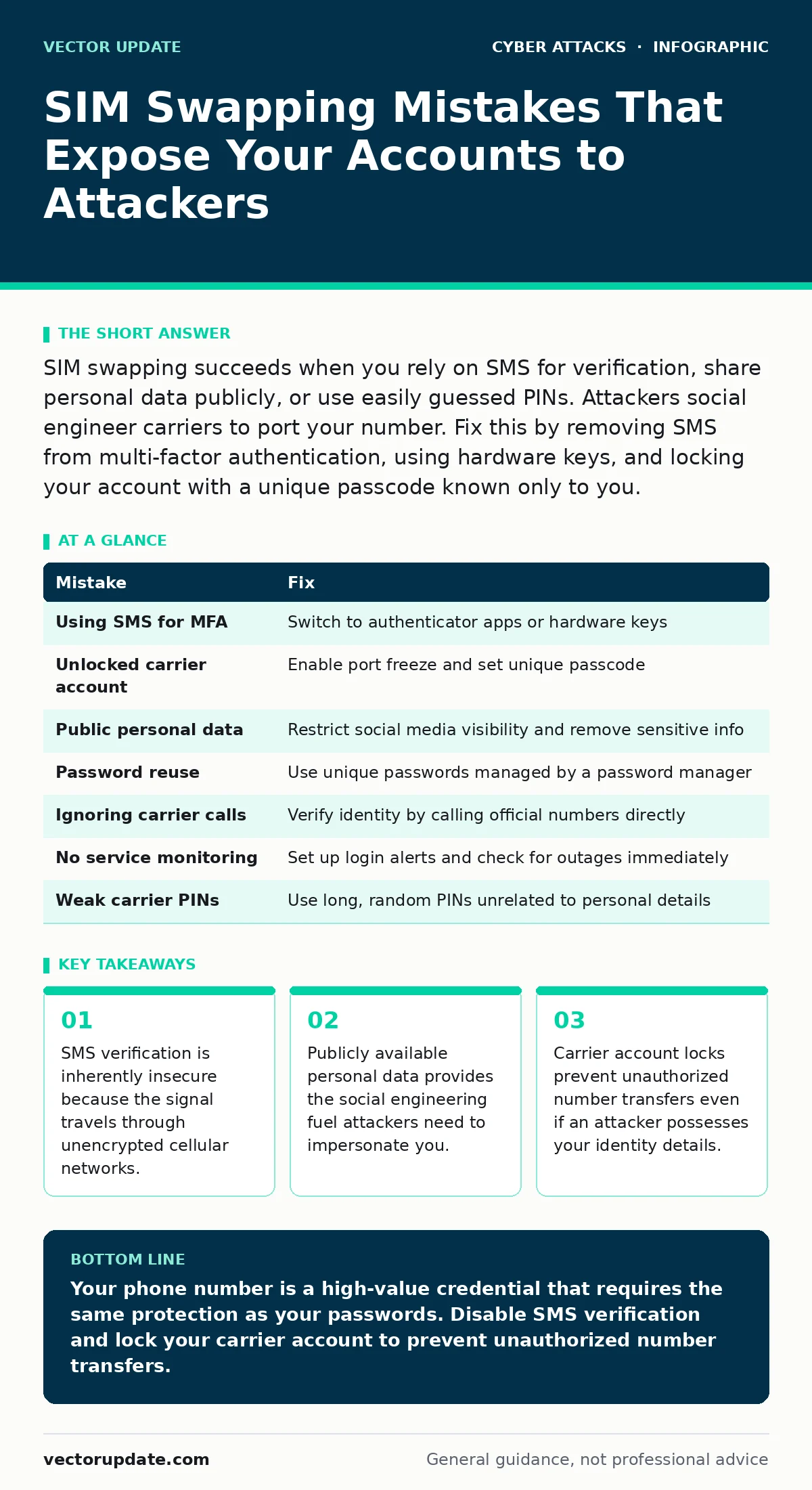
SIM swapping succeeds when you rely on SMS for verification, share personal data publicly, or use easily guessed PINs. Attackers social engineer carriers to port your number. Fix this by removing SMS from multi-factor authentication, using hardware keys, and locking your account with a unique passcode known only to you.
Mistake 1: Using SMS for Multi-Factor Authentication
Why it hurts:
SMS messages travel through the cellular network without strong encryption. An attacker who controls your phone number receives these codes instantly. This method assumes the phone itself is secure, ignoring that the number is the actual credential. You hand the key to anyone who can convince the carrier to move the service.
The fix:
Disable SMS-based multi-factor authentication on all critical accounts. Switch to an authenticator app that generates time-based one-time passwords locally on your device. These codes never leave your phone, so intercepting them requires physical access. For the highest security, use a hardware security key that connects via USB or NFC.
Mistake 2: Leaving Your Phone Number Unlocked at the Carrier
Why it hurts:
Most mobile carriers allow account changes over the phone or via chat support. Without a specific lock, an attacker who knows your name and address can request a number transfer. They pose as you, answer basic verification questions, and redirect your service to a new SIM card. You lose access immediately, and the attacker gains full control of your communications.
The fix:
Contact your mobile carrier and request a port freeze or SIM swap lock. This feature blocks any transfer of your number to another provider or new SIM without your explicit written consent. Set a unique, complex passcode for your carrier account that differs from your usual passwords. Never reuse this code on other services.
Mistake 3: Publishing Personal Details on Social Media
Why it hurts:
Attackers build profiles to bypass identity verification checks. They scrape your birth date, mother’s maiden name, previous addresses, and pet names from public posts. This information answers the secret questions carriers and banks use to verify identity. The more detail you share, the easier it becomes for an attacker to impersonate you convincingly during the social engineering phase.
The fix:
Audit your social media privacy settings to restrict who can view your posts. Remove sensitive information like full birth dates, home addresses, and identification numbers from public profiles. Assume any data you post online is permanent and searchable. Treat your digital footprint as a potential toolkit for an attacker preparing to impersonate you.
Mistake 4: Reusing Passwords Across Financial and Communication Services
Why it hurts:
If an attacker compromises your email or social media account through a data breach, they gain access to password reset emails. They can then reset the password for your carrier account or banking portal. This chain reaction allows them to unlock your phone number or drain funds. Reusing credentials creates a single point of failure that compromises multiple distinct security boundaries.
The fix:
Use a password manager to generate and store unique, complex passwords for every account. Ensure your email account has a different password than your mobile carrier or bank. Enable multi-factor authentication on all accounts that support it. This containment strategy ensures that a breach in one service does not automatically grant access to others.
Mistake 5: Ignoring Unknown Calls from Your Carrier
Why it hurts:
Attackers often call pretending to be customer support to verify your identity or push a transfer. They may claim there is a network issue or billing error. If you engage, they extract verification details or pressure you into approving changes. Ignoring unsolicited calls prevents them from gathering the information needed to social engineer their way into your account.
The fix:
Never call back numbers displayed on caller ID for sensitive account changes. Hang up and dial the official customer service number found on your carrier’s website or your billing statement. Verify the identity of anyone claiming to be support by asking for specific, non-public account details. Trust only channels you initiate.
See also: How Privileged Access Management Works: The Mechanics Behind Secure Admin Rights · Cryptomining Attacks on Exposed Servers: Detection and Mitigation
Mistake 6: Failing to Monitor for Service Interruptions
Why it hurts:
A sudden loss of service is the primary indicator of a successful SIM swap. If your phone shows "No Service" but you are in a coverage area, an attacker may have ported your number. Delaying action gives them time to reset passwords and access accounts. Early detection allows you to contact your carrier to freeze the transfer before they complete their objective.
The fix:
Set up login alerts for critical accounts to notify you of new device logins or password changes. If you lose service unexpectedly, call your carrier from a different phone immediately. Use conditional access policies to block logins from unrecognized locations or devices. Rapid response limits the window of opportunity for the attacker.
Mistake 7: Using Weak PINs for Carrier Account Access
Why it hurts:
Carrier account PINs are often simple, like 1234 or your birth year. Attackers use automated tools to guess these common combinations. A weak PIN provides no real barrier to an attacker who has already bypassed other verification steps. It acts as the final gatekeeper for your number’s security.
The fix:
Set a long, random PIN for your carrier account that does not relate to your personal life. Avoid sequential numbers or repeated digits. Change this PIN periodically. Treat this PIN with the same security rigor as a master password, as it grants control over your primary communication channel.
| Mistake | Fix |
|---|---|
| Using SMS for MFA | Switch to authenticator apps or hardware keys |
| Unlocked carrier account | Enable port freeze and set unique passcode |
| Public personal data | Restrict social media visibility and remove sensitive info |
| Password reuse | Use unique passwords managed by a password manager |
| Ignoring carrier calls | Verify identity by calling official numbers directly |
| No service monitoring | Set up login alerts and check for outages immediately |
| Weak carrier PINs | Use long, random PINs unrelated to personal details |
Key takeaways
- SMS verification is inherently insecure because the signal travels through unencrypted cellular networks.
- Publicly available personal data provides the social engineering fuel attackers need to impersonate you.
- Carrier account locks prevent unauthorized number transfers even if an attacker possesses your identity details.
Your phone number is a high-value credential that requires the same protection as your passwords. Disable SMS verification and lock your carrier account to prevent unauthorized number transfers.
Frequently asked questions
Can I still receive texts if I disable SMS MFA?
Yes, disabling SMS for multi-factor authentication only stops security codes from being sent via text. You can still receive personal messages and use SMS for non-security purposes.
What should I do if I suspect a SIM swap?
Immediately call your carrier from a different phone to report the issue and freeze your account. Contact your bank and email provider to secure those accounts as well.
Are authenticator apps safe if my phone is stolen?
Authenticator apps are safer than SMS because they do not require the phone number to be active. However, you should still use a strong device passcode and remote wipe capabilities.
Does two-factor authentication stop account takeover?
Two-factor authentication significantly reduces the risk of account takeover by adding a second verification step. It does not eliminate risk if the attacker can intercept the second factor, such as via SIM swapping.
How this guide was produced: written by the Vector Update editorial team with AI assistance, checked against the public references listed below, and reviewed when the facts change. See our editorial policy or report an error.