What Is Trojans Virus: How Disguised Malware Works and How to Stop It
Trojan malware hides inside legitimate-looking software to bypass security filters, making traditional antivirus signatures ineffective against modern variants.
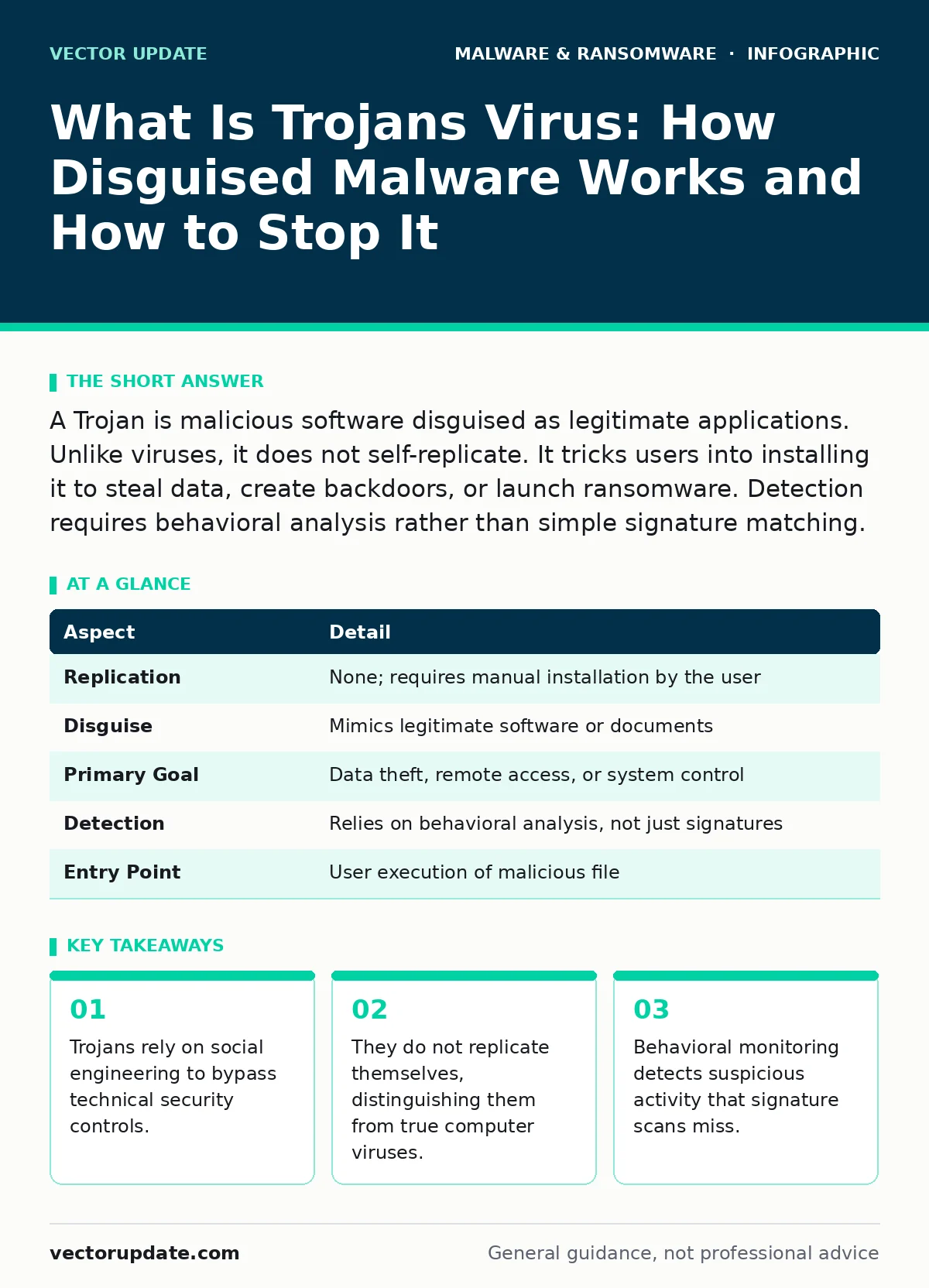
A Trojan is malicious software disguised as legitimate applications. Unlike viruses, it does not self-replicate. It tricks users into installing it to steal data, create backdoors, or launch ransomware. Detection requires behavioral analysis rather than simple signature matching.
Understanding the Trojan Horse Analogy
Imagine receiving a large wooden horse as a gift. The city welcomes it inside the walls because it appears to be a valuable offering. At night, soldiers emerge from inside the horse and open the gates for an invading army. The gift was never the point. The deception was the mechanism.
A Trojan operates on this exact principle. It presents itself as useful software, such as a game crack, a productivity tool, or a document viewer. You install it willingly. Once active, it performs hidden actions that compromise your system. The legitimacy of the packaging is the attack vector.
What Is Trojans Virus and Why the Name Misleads
When users ask what is trojans virus, they are often conflating two distinct concepts. A Trojan is a type of malware. A virus is a specific mechanism that self-replicates by attaching to other programs. Trojans do not replicate. They require human interaction to spread.
The term "Trojan virus" persists in common parlance but is technically incorrect. This misnomer causes confusion when selecting defenses. Antivirus software looks for known patterns of replication. Trojans often lack these patterns. They rely on stealth and permission rather than propagation. Understanding this distinction changes how you approach detection. You are not looking for a spreading infection. You are looking for a hidden intruder.
| Aspect | Detail |
|---|---|
| Replication | None; requires manual installation by the user |
| Disguise | Mimics legitimate software or documents |
| Primary Goal | Data theft, remote access, or system control |
| Detection | Relies on behavioral analysis, not just signatures |
| Entry Point | User execution of malicious file |
How Trojans Bypass Security Controls
Trojans succeed because they exploit trust. Security tools often whitelist known applications. If a Trojan masquerades as a trusted program, it may slip through initial scans. This is why signature-based detection fails against new variants. The file hash is unknown to the security database.
The malware executes its payload only after installation. This delay allows it to blend in with normal system processes. It may wait for specific triggers, such as a reboot or a network connection. During this dormant phase, it consumes minimal resources. Standard monitoring tools often ignore low-impact processes. The Trojan uses this silence to establish persistence. It modifies system settings to ensure it runs every time the machine starts.
Who Trojans Target and How They Spread
Trojans affect anyone who executes untrusted code. System administrators are frequent targets because their accounts have elevated privileges. A Trojan running with admin rights can disable security software. It can create new user accounts with full access.
Distribution methods vary but always require user action. Phishing emails are the most common vector. The email contains a link or attachment that appears legitimate. Clicking the link downloads the Trojan. Opening the attachment executes it. Some Trojans hide in pirated software. Users seeking free licenses often disable security features to install the crack. This dual action removes the primary defense layer.
Supply chain attacks represent a more sophisticated threat. A legitimate software vendor’s build server is compromised. The Trojan is inserted into the official update. Thousands of users install the malicious update because they trust the vendor. This bypasses user skepticism entirely.
Common Misconceptions About Trojan Defense
Many users believe that having antivirus software provides complete protection. This is false. Traditional antivirus relies on known signatures. New Trojans have no signature until researchers analyze them. There is a window of vulnerability between creation and detection.
Another misconception is that Trojans only target personal computers. Modern Trojans are platform-agnostic. They target servers, mobile devices, and industrial control systems. Mobile malware often arrives as seemingly harmless apps. These apps request excessive permissions. Granting access to contacts, messages, or location data allows the Trojan to harvest information.
Some believe that offline systems are immune. This is incorrect. Trojans can be transferred via physical media. A USB drive inserted into an offline machine can execute a Trojan. The malware then waits for the next connection to the network. It exfiltrates data or spreads laterally. Air gaps are only effective if physical access is strictly controlled.
See also: Warning Signs of Nation-State Cyber Attacks You Can Detect Now · Keyloggers and Spywares: How They Capture Data and How to Detect Them
Detecting and Removing Active Trojans
Detection requires looking for behavior, not just files. Check for processes that consume high CPU or network resources without a clear purpose. Look for services that start unexpectedly. Verify the digital signatures of all running applications. Unsigned executables are a major red flag.
If you suspect an infection, isolate the machine immediately. Disconnect it from the network. This prevents data exfiltration and lateral movement. Do not attempt to delete the Trojan while the system is online. The malware may be actively transmitting data or waiting for commands.
Use specialized tools for removal. Standard deletion may leave registry keys or scheduled tasks intact. These remnants allow the Trojan to reinstall itself. A dedicated removal tool scans for these persistence mechanisms. It also checks for associated files in temporary directories.
For complex infections, consider wiping the drive. This is the only way to guarantee complete removal. Reinstall the operating system from trusted media. Restore data from clean backups. Verify that the backup was created before the infection occurred. Restoring infected backups reintroduces the threat.
Preventing Future Infections
Prevention focuses on reducing the attack surface. Enforce application whitelisting. This allows only approved software to run. Unknown executables are blocked at the operating system level. This stops Trojans before they can execute.
Keep all software updated. Patches often close vulnerabilities that Trojans exploit. Enable automatic updates where possible. Regular updates reduce the window of opportunity for attackers.
Train users to recognize social engineering. Trojans rely on urgency and curiosity. Emails claiming account suspension or prize winnings are common lures. Verify the source before clicking links. Check the sender’s address carefully. Spoofed addresses often contain subtle typos.
Implement least privilege principles. Users should operate with standard permissions. Administrative rights should be granted only when necessary. This limits the damage a Trojan can cause. Even if a Trojan executes, it cannot modify system-wide settings without elevation.
Monitor network traffic for anomalies. Extended detection and response (XDR) platforms correlate data from endpoints and networks. They identify patterns that single tools miss. Behavioral analytics can flag a Trojan even if its signature is unknown.
Consider the impact of infostealers on your data security. These specialized Trojans harvest credentials and session tokens. They bypass two-factor authentication by stealing active sessions. Detecting them requires monitoring for unusual login locations and times.
Business continuity planning must account for ransomware delivered via Trojans. The Trojan may be the initial access tool. The ransomware is the payload. Having disaster recovery plans in place ensures rapid restoration. Test these plans regularly. Unverified backups are useless during an incident.
Removing malware from an Android phone often requires a factory reset. Mobile operating systems sandbox apps, but compromised permissions can break this isolation. If a Trojan gains accessibility services access, it can monitor all screen activity. This makes remote wiping the safest option.
Key takeaways
- Trojans rely on social engineering to bypass technical security controls.
- They do not replicate themselves, distinguishing them from true computer viruses.
- Behavioral monitoring detects suspicious activity that signature scans miss.
Frequently asked questions
Can a Trojan spread without human interaction?
No, Trojans do not self-replicate. They require a user to download and execute the malicious file. This distinguishes them from worms and viruses.
How do I know if my computer has a Trojan?
Look for performance slowdowns, unexpected pop-ups, and unauthorized changes to settings. Check for unknown processes in task manager and monitor network traffic for unusual outbound connections.
Are mobile devices safe from Trojans?
No, mobile malware is prevalent. Trojans on phones can steal messages, contacts, and banking credentials. They often hide in apps downloaded from third-party stores.
Does antivirus software stop all Trojans?
Traditional antivirus may miss new Trojans. Behavioral monitoring and endpoint detection are more effective. Layered security provides better protection than a single tool.
How this guide was produced: written by the Vector Update editorial team with AI assistance, checked against the public references listed below, and reviewed when the facts change. See our editorial policy or report an error.