7 Mistakes That Expose Customer Data and How to Fix Them
Most customer data exposure stems from configuration errors and permission sprawl rather than external hacking attempts.

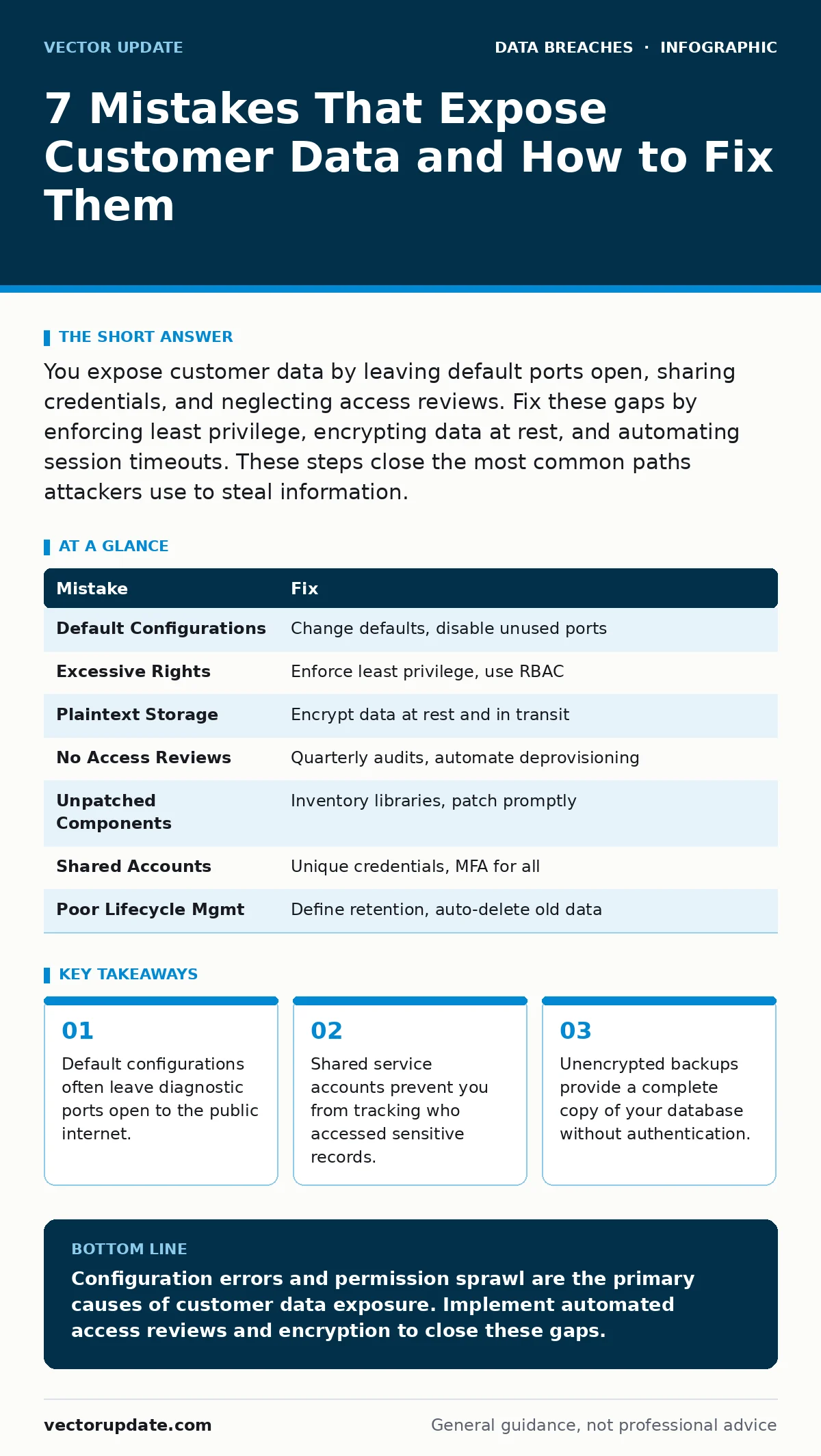
You expose customer data by leaving default ports open, sharing credentials, and neglecting access reviews. Fix these gaps by enforcing least privilege, encrypting data at rest, and automating session timeouts. These steps close the most common paths attackers use to steal information.
Mistake 1: Leaving Default Configurations Active
You install software and start using it without changing the initial settings. Vendors ship products with default usernames, passwords, and open diagnostic ports to simplify setup. Attackers scan the internet for these known defaults. They gain immediate access to your systems. This bypasses all your other security controls.
Why it hurts:
Default configurations create a predictable entry point. An attacker does not need to exploit a complex vulnerability. They simply guess the vendor’s standard credentials. Once inside, they can move laterally to your customer database. This happens even if your perimeter firewall is strong.
The fix:
Change every default password before connecting the system to the network. Disable unused ports and services. Many applications allow you to rename the administrative interface. This adds friction for automated scanning tools. Review the vendor documentation for a hardening checklist. Apply these changes during the deployment phase.
Mistake 2: Granting Excessive Administrative Rights
You give users full administrative access to make their jobs easier. This violates the principle of least privilege. Users perform daily tasks with elevated permissions. A single compromised account gives an attacker control over the entire system. You lose the ability to track specific user actions.
Why it hurts:
Excessive rights increase the impact of account takeover fraud. If a user’s credentials are stolen, the attacker inherits all their permissions. They can read, modify, or delete any customer record. This turns a minor phishing incident into a major data breach. You cannot limit the damage to a single service.
The fix:
Assign permissions based on job function, not convenience. Use role-based access control to group permissions. Regularly audit who has administrative rights. Remove access when employees change roles or leave. Implement just-in-time access for rare administrative tasks. This limits the window of opportunity for attackers.
Mistake 3: Storing Data in Plaintext Formats
You save customer information in files that anyone with access can read. This includes spreadsheets, text files, and unencrypted databases. You assume that network security is enough to protect the data. This ignores the risk of insider threats and physical theft.
Why it hurts:
Plaintext data is useless to you if stolen, but valuable to attackers. If a device is lost or stolen devices are not encrypted, the data is exposed. Internal employees can copy sensitive records without leaving a trace. You cannot enforce data encryption policies if the data is never encrypted. This leaves you vulnerable to both external and internal threats.
The fix:
Encrypt all customer data at rest and in transit. Use strong encryption standards supported by your operating system. Manage encryption keys separately from the data. Ensure that backups are also encrypted. This ensures that stolen files remain unreadable without the correct keys. It protects you even if physical security fails.
Mistake 4: Neglecting Regular Access Reviews
You grant access and forget to remove it when it is no longer needed. Employees change departments, contractors finish projects, and permissions accumulate. This creates permission sprawl. You have no visibility into who actually needs access to what.
Why it hurts:
Stale accounts are a primary vector for data exposure. An attacker who compromises a former employee’s account retains access. You may not detect this for months. This makes access reviews critical for maintaining security hygiene. Without them, your access control policies become meaningless over time.
The fix:
Schedule quarterly access reviews for all systems containing customer data. Verify that each user still requires their current permissions. Remove access for inactive accounts immediately. Automate the deprovisioning process where possible. This reduces the attack surface and ensures compliance. It also helps you identify unusual access patterns.
Mistake 5: Failing to Patch Third-Party Components
You focus on patching your core operating system and ignore libraries. Modern applications rely on dozens of third-party components. These components often have known vulnerabilities. Attackers target these dependencies because they are frequently overlooked.
Why it hurts:
A single unpatched library can compromise the entire application. Attackers exploit known vulnerabilities in popular frameworks. This allows them to execute code on your servers. You may not be aware of the vulnerability until it is too late. This is a common cause of payment card theft and other data breaches.
The fix:
Maintain an inventory of all third-party components in your applications. Subscribe to security advisories for these libraries. Apply patches as soon as they are released. Test patches in a staging environment before deployment. This reduces the risk of exploitation and keeps your systems secure. It also helps you manage technical debt.
See also: Difference Between Identity and Access Management Explained · Principle of Least Privilege Example for System Security
Mistake 6: Using Shared Service Accounts
You create a single account for a group of users or a service. This makes it impossible to track individual actions. If the credentials are compromised, you cannot revoke access for a specific user. This creates a single point of failure.
Why it hurts:
Shared accounts obscure audit trails. You cannot determine who performed a specific action. This complicates incident response and forensic analysis. If the password is leaked, all users with access are compromised. This makes it difficult to limit the scope of a breach. It also violates accountability principles.
The fix:
Assign unique credentials to each user and service. Use service principals or API keys for automated processes. Implement multi-factor authentication for all accounts. Monitor access logs for unusual activity. This ensures that you can track every action to a specific identity. It also allows you to revoke access quickly if needed.
Mistake 7: Ignoring Data Lifecycle Management
You keep customer data longer than necessary. Old records accumulate in databases and backups. This increases the amount of data at risk. You expose yourself to liability and regulatory fines.
Why it hurts:
Stale data is often less protected than active data. Security controls may not be applied consistently across all storage locations. Attackers target old backups because they are rarely monitored. This increases the likelihood of data exposure. You also face higher costs for storing unnecessary data.
The fix:
Define a data retention policy for each type of customer data. Automatically delete data that is no longer needed. Securely erase data from backups and archives. Regularly audit your storage for compliance. This reduces the attack surface and minimizes liability. It also improves system performance and reduces storage costs.
| Mistake | Fix |
|---|---|
| Default Configurations | Change defaults, disable unused ports |
| Excessive Rights | Enforce least privilege, use RBAC |
| Plaintext Storage | Encrypt data at rest and in transit |
| No Access Reviews | Quarterly audits, automate deprovisioning |
| Unpatched Components | Inventory libraries, patch promptly |
| Shared Accounts | Unique credentials, MFA for all |
| Poor Lifecycle Mgmt | Define retention, auto-delete old data |
Key takeaways
- Default configurations often leave diagnostic ports open to the public internet.
- Shared service accounts prevent you from tracking who accessed sensitive records.
- Unencrypted backups provide a complete copy of your database without authentication.
Configuration errors and permission sprawl are the primary causes of customer data exposure. Implement automated access reviews and encryption to close these gaps.
Frequently asked questions
How do I know if my customer data has been exposed?
Monitor logs for unusual access patterns and check Have I Been Pwned for compromised credentials. Look for unexpected data exports or login failures.
Is cyber insurance enough to protect my business?
Insurance covers financial losses but does not prevent data exposure. You must implement technical controls to reduce risk and meet policy requirements.
How often should I update my security policies?
Review and update policies annually or after significant changes. Ensure they reflect current threats and regulatory requirements.
What is the first step in a data breach response?
Isolate affected systems to prevent further exposure. Notify stakeholders and begin forensic analysis to determine the scope.
How this guide was produced: written by the Vector Update editorial team with AI assistance, checked against the public references listed below, and reviewed when the facts change. See our editorial policy or report an error.